
_ ReadyForDrive
Make every drive ready.
Stay organized. Stay informed. Enjoy a simpler ownership experience
Manage vehicle documents, track RC, insurance and PUC expiry, get local reminders, and view supported vehicle status on Apple CarPlay. Your files stay on-device.
Keep your vehicle documents organized, stay ahead of expiry dates, and simplify vehicle ownership with your personal Vehicle Compliance & Care Assistant.
Whether you own a car, scooter, motorcycle or multiple vehicles, manage important documents, track renewals, and keep maintenance information handy – all from one app.
_ What is ReadyForDrive?
ReadyForDrive is an iPhone app with Apple CarPlay support that tracks your vehicle compliance documents — RC, insurance, PUC, HSRP, FASTag and more — and reminds you before they expire.
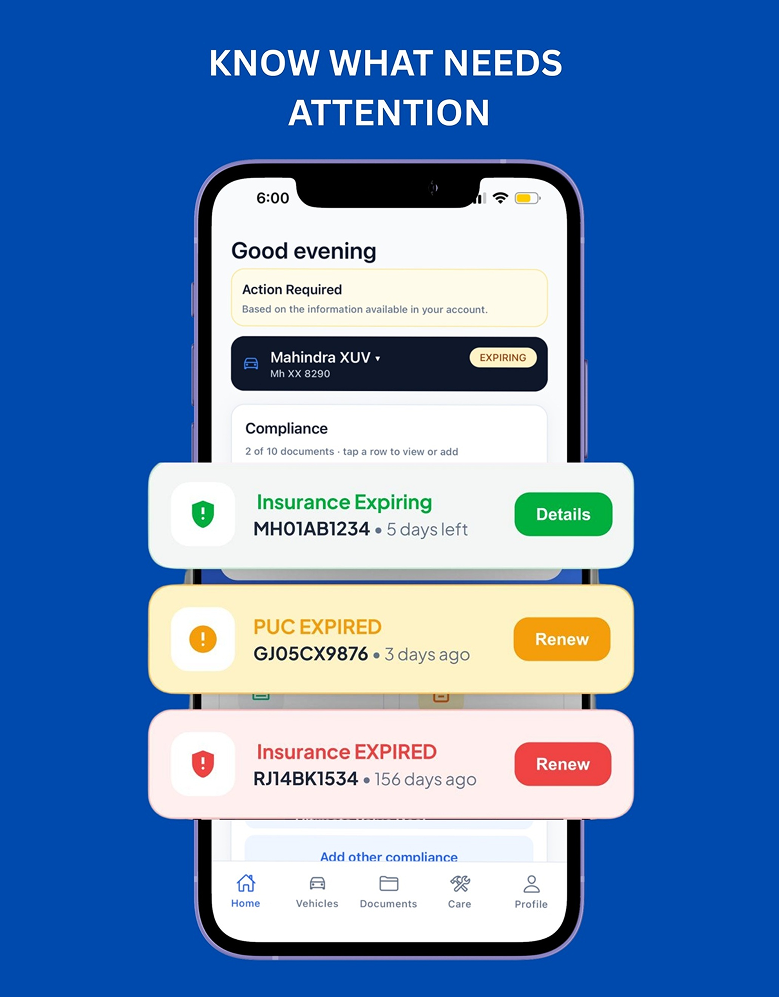
Reminders before expiry
Local alerts from 30 days before expiry, on the day, and after
A glance on CarPlay
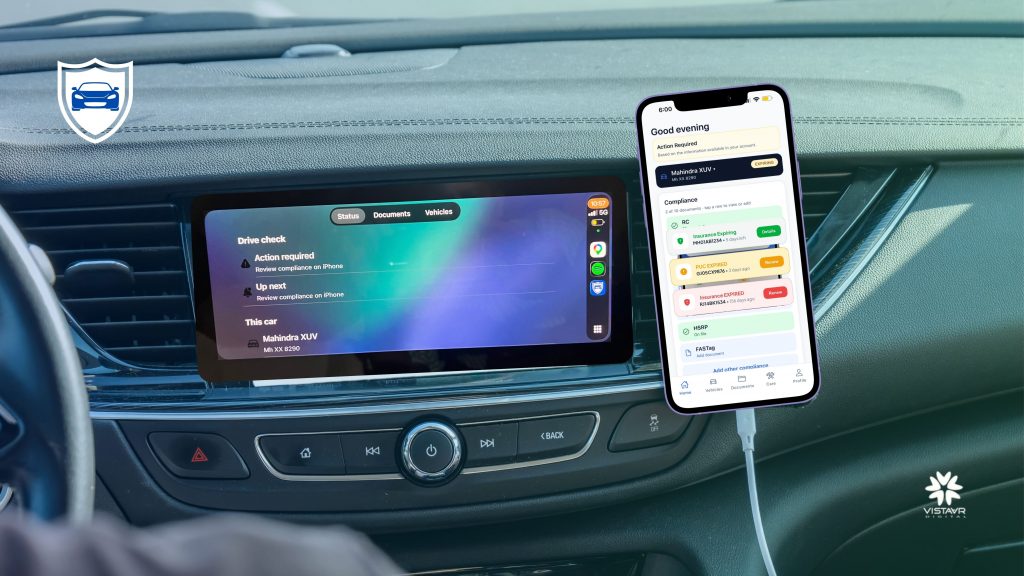
A Drive check shows status for the connected car.
Private by design
Your documents stay on your phone — never on our servers.
_ Key Features
Everything you need to stay on top of your vehicle paperwork. Organize vehicle documents, track expiry dates, manage maintenance, and monitor all your vehicles in one app. Your documents stay securely stored on your device.
01
Vehicle Document Organizer
Keep all your important vehicle documents organized in one convenient place. Easily manage your Registration Certificate (RC), Motor Insurance, Pollution Under Control (PUC) certificate, Driving Licence, fitness certificates, permits, and other vehicle-related documents. Quickly access the information you need without searching through physical papers or multiple folders.
02
Expiry Reminders
Stay ahead of important renewal dates with convenient, local notifications. Set reminders for upcoming document expiries and receive alerts before and after the expiry date based on your preferences. Get timely notifications for insurance renewals, PUC certificates, registration documents, and other essential vehicle paperwork, helping you avoid missed deadlines.
03
Manage Multiple Vehicles
Manage all your cars, motorcycles, scooters, and other vehicles in one place. Add multiple vehicles and maintain a separate record of each vehicle’s documents, expiry dates, and compliance status. Switch between vehicles easily and identify which documents need renewal or attention at a glance.
04
Vehicle Compliance Overview
Get a clear overview of your vehicle’s document status from a single dashboard. Quickly identify valid, expiring, expired, and missing document information. With important alerts and status indicators, you can prioritize renewals, stay organized, and keep track of your vehicle documentation without going through multiple files.
05
Vehicle Care & Maintenance
Keep your vehicle maintenance information organized alongside your important documents. Maintain service records, track maintenance activities, and set reminders for routine vehicle care. Having essential information in one place helps you stay on top of maintenance schedules and manage your vehicle more efficiently.
06
Apple CarPlay Compatibility
Access supported vehicle status information through a convenient, glanceable Apple CarPlay experience, where available. View essential information in a driving-friendly interface designed to minimize distraction and keep relevant vehicle details within easy reach. Available features may vary depending on your device and supported CarPlay functionality.
07
Your Documents Stay on Your Device
Your actual vehicle document files are stored locally on your phone and are not uploaded to our servers. Keep important documents accessible on your device while maintaining control over your personal information. Organize your files privately and access them whenever you need them, without relying on cloud storage for your actual document files.
_ Data security
Your data stays on your phone.
ReadyForDrive keeps your vehicle documents on your personal iPhone. We do not store your documents on our servers or anywhere else — they stay with you.
- Stored on your device: RC, insurance, PUC and other files are saved locally on your iPhone.
- Never uploaded: Your document files are not sent to or kept on our servers.
- On-device reminders: Expiry reminders are scheduled by your phone, not our servers.
_ How does ReadyForDrive work?
Download the app
Get ReadyForDrive from the App Store on your iPhone.
Add vehicles & documents
Enter your vehicles and document expiry dates — before you start driving.
Check on CarPlay
On a compatible CarPlay setup, see a Drive check for your car.
Set up the app while parked. Never interact with your phone while driving and always follow local road-safety laws.
Compatibility & requirements
- iPhone app, available on the Apple App Store
- CarPlay view requires a CarPlay-compatible vehicle or head unit
- Reminders depend on your phone’s notification settings
_ Frequently asked questions
ReadyForDrive is an iPhone app with Apple CarPlay support that helps you keep track of your vehicle documents and their expiry dates. You add your vehicles and documents such as RC, insurance, PUC, HSRP and FASTag, and the app shows what is valid, expiring or expired.
It organises compliance documents per vehicle, highlights items that need attention, and sends local expiry reminders (by default 30, 14, 7, 3 and 1 day before, on expiry, and 3 and 7 days after). On CarPlay, a Drive check screen summarises status for the connected car.
Your documents stay on your own iPhone. ReadyForDrive stores your document files locally on your device — we do not upload them to our servers or store them anywhere else. Expiry reminders are also scheduled on your phone and are not sent through our servers, so your personal paperwork remains in your hands.
No. Document files and photos you add are kept only on your phone and are never uploaded to ReadyForDrive servers. If you delete the app or change phones, keep your own copies of important documents, because we cannot restore files we never stored.
Download ReadyForDrive from the Apple App Store on your iPhone using the Download on the App Store button on this page. Once installed, open the app and add your first vehicle.
Yes. ReadyForDrive includes a CarPlay screen with Status, Documents and Vehicles tabs showing a drive check for your car. Detailed review and editing happen on iPhone. Availability depends on your vehicle or head unit supporting CarPlay.
Install the app, add a vehicle with its registration number, then add documents and their expiry dates. Do this before you start driving. When your iPhone connects to CarPlay, the drive check will reflect the information in your account.
Your document files are stored locally on your device and reminders are scheduled on your phone, so viewing your documents does not depend on our servers.
Note that reminders use your phone’s notification settings and may be delayed when the phone is offline, in Low Power Mode, or has notifications disabled.
Ready for your next drive?
Keep your documents in order and see your status at a glance before you set off.